OwnGit
OwnGit is a self-hosted Git server for home labs and local machines. It keeps private repositories and their history on your own computer, NAS, or home server, with a browser dashboard for everyday use. Repositories remain ordinary bare Git repositories served by the Git installation on the host. No cloud Git account or subscription is required.
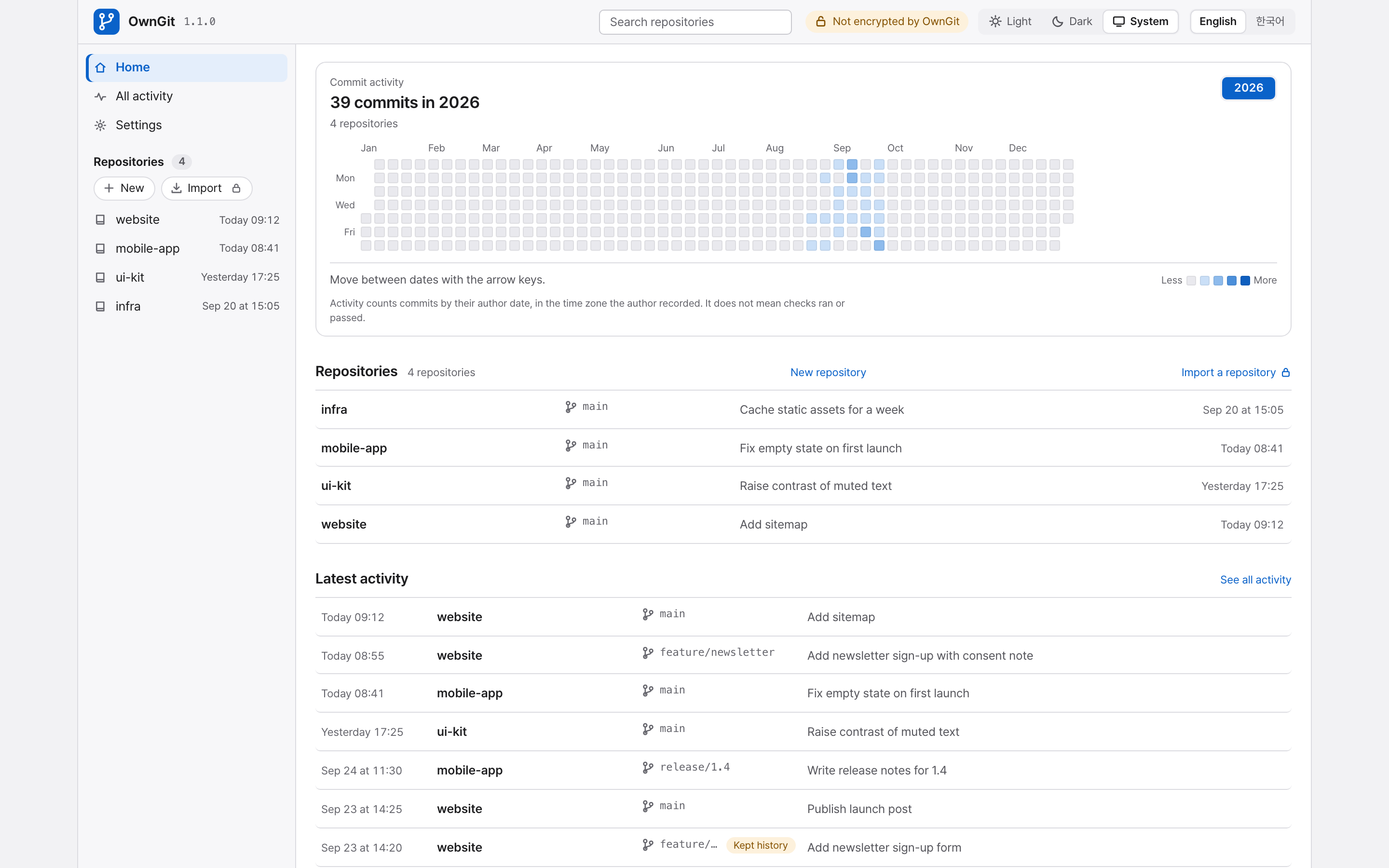
What it does
- Supports clone, fetch, and push over Smart HTTP from standard Git clients.
- Shares OwnGit over HTTPS on your tailnet through Tailscale Serve, turned on in Settings or with
owngit tailscale on. OwnGit also runs behind a reverse proxy such as Caddy, nginx, or Traefik. Network settings saved withowngit network setapply at every start, so a server started as a background service, for example withbrew services, can be reached from other devices. See Share on your tailnet over HTTPS and Behind a reverse proxy. - Shows repositories, branches, tags, files, commits, diffs, author-date activity, pull requests, and revision-bound check evidence in the browser.
- Downloads a branch, tag, or commit as a ZIP or tar.gz archive, from the browser or with
curl. - Shows the languages a repository is written in on its overview, by the size of its files on the default branch. Data and prose files (JSON, YAML, Markdown, plain text) and vendored, generated, and documentation paths are not counted; Linguist attributes in
.gitattributesare honored with Git 2.40 or newer. - Creates and merges pull requests in the browser at the exact revisions it displays. Pull requests can be closed without merging and reopened. JSON CLI commands can also create, inspect, review, merge, close, and reopen them. Ordinary
git pushworks without a pull request, and review is optional. - Lists, shows, and creates repositories from the command line with
owngit repo. Offers the pull request, repository, and check commands to coding tools that support MCP throughowngit mcp, a local server on standard input and output. See Coding tool integration. - Records checks that a helper runs in your own environment. Configured checks that the owner enables can run on the host, in restricted local Docker, or on a separate runner. Checks and reviews are advisory and never hold a merge.
- Imports a repository from another HTTPS Git host and refreshes it on demand or on a schedule, without writing to the source.
- Keeps replaced or deleted branch and tag history in hidden refs. The browser restores a whole tree or selected files after previewing every change.
- Creates and restores offline backups of repository refs and objects, pull request, check, and import records, and portable settings.
- Runs as one Go executable with a host-local SQLite database. No Node, Python, or database service is required at runtime.
- Provides English and Korean interfaces with Light, Dark, and System appearance modes.
Install
Every install route needs Git with an executable git-http-backend on the host. Homebrew and the Arch Linux package install Git for you.
With Homebrew on macOS (Apple silicon) or Linux (x64, ARM64):
brew install juliankang4/tap/owngit
With npm on macOS (Apple silicon), Linux (x64, ARM64), or Windows (x64). This route needs Node.js to install and to start OwnGit:
npm install -g owngit
On Arch Linux (x64, ARM64) or Omarchy, build the package from the PKGBUILD attached to each release from 1.0.3 on. makepkg downloads the release archive, checks its SHA-256, and installs owngit with pacman; it needs the base-devel group. An AUR package, owngit-bin, is planned.
mkdir owngit-bin && cd owngit-bin
curl -fLO https://github.com/juliankang4/owngit/releases/latest/download/PKGBUILD
makepkg -si
Or download the archive for your platform from GitHub Releases and check it against SHA256SUMS. The binaries are not signed. If macOS refuses to run a binary you downloaded with a browser, run xattr -d com.apple.quarantine owngit once.
To build from source with Go 1.27 or newer:
git clone https://github.com/juliankang4/owngit.git
cd owngit
go build -o bin/owngit ./cmd/owngit
Quickstart
owngit serve
From a source build, run ./bin/owngit serve; from an unpacked archive, ./owngit serve. The first time OwnGit starts from a terminal, setup runs in that terminal: choose English or 한국어, then "Continue in this terminal" or "Open the web dashboard". In the terminal, passwords stay hidden as you type. On the web dashboard, the browser shows a short code, and you approve that browser in the terminal before it can continue. The default address is http://127.0.0.1:7654. See First-time setup.
When OwnGit starts without a terminal, as under brew services, it writes an owner-readable setup file inside the state directory instead and opens it in your browser. With --no-open, or when the browser cannot be opened, the server log shows the file's path. The setup secret is never printed or passed as a browser argument.
To start OwnGit at login with Homebrew, run brew services start owngit. Its log, including the setup file path on first start, is $(brew --prefix)/var/log/owngit.log.
Create a repository from the dashboard, then use its clone address, for example http://127.0.0.1:7654/git/project.git, with any Git client. Operations covers access from other devices, moving existing repositories, recovery, and backups.
Resource use
OwnGit is one program of about 30 MB (an 18 MB download) plus the Git already on the computer. Measured with OwnGit 1.0.3 after setup, once memory had settled with nobody using it:
| Linux x64 | macOS (Apple silicon) | |
|---|---|---|
| Memory, no repositories | about 45 MB | about 55 MB |
| Memory, 100 small repositories | about 50 MB | about 50 to 70 MB |
| CPU | under 0.1% of one core | under 0.1% of one core |
Each password check needs about 70 MB more for a moment, because passwords are hashed with Argon2id. OwnGit checks a password when you set one or sign in, when you confirm a settings change with the administrator password, and on Git and API requests when a shared access password is set. After the shared password is checked once, OwnGit accepts the same password for five minutes without hashing it again, so the several requests of one clone or push need one check. It runs at most four checks at once and gives the memory back to the system a few minutes later. Each clone or push also runs Git, whose memory depends on the repository. Memory is the resident set size reported by /proc and ps; Activity Monitor on macOS can show a larger number.
Access and security
- The server is local-only by default. General repository access can be password-free or protected by one shared password. There are no individual accounts.
- A separate administrator password protects security settings, and every security change asks for it again.
- After setup, OwnGit asks GitHub once a day whether a newer release exists and shows a notice on the dashboard. It sends no repository data and never updates itself. Turn it off in Settings, or start with
--no-update-checkso it never checks. See New-release notice. - OwnGit serves plain HTTP, which is not encrypted, and has no built-in TLS. TLS comes from Tailscale on this computer (see Share on your tailnet over HTTPS) or a reverse proxy in front of OwnGit, and OwnGit believes forwarded headers only from proxies you configure (see Behind a reverse proxy). Prefer Tailscale or your own VPN for connections from another device. Public Internet hosting is out of scope.
Status and limits
A force-push or branch deletion leaves the old commits in kept history, so a committed secret stays in OwnGit and its backups. Deleting the whole repository with its files is the only way to remove that history, and earlier backups still contain it; rotate any secret you push by mistake. Kept history is not a backup, and backups run only when you start them. Host and runner check commands run with their account's permissions and are not sandboxes. OwnGit records review labels and check results that other tools supply, but it never runs reviewers or coding agents. Git LFS objects are not hosted or imported. Pull request merge requires Git 2.38 or newer on the OwnGit host.
License
OwnGit's source is available under the MIT License. Notices for the third-party code and assets built into the executable are in THIRD_PARTY_NOTICES.
Documentation
- Operations: setup, access, recovery, moving repositories, imports, pull requests, checks, storage, and backups
- Automatic checks: checks that run on the host, in restricted Docker, or on a separate runner
- Coding tools: running project checks from a coding tool, and the shared skill
- Contributing: building, testing, and changing OwnGit
- Changelog: notable changes in each version
- Security policy: reporting a vulnerability privately